
SIGN BY MPTY
Digital waivers
for WordPress.
Let visitors complete consent forms and sign agreements on your WordPress site. Save their details, signatures and PDF records together.
HOW SIGN WORKS
Collect, save and manage signed forms
01
Collect consent and signatures
Visitors enter their details, read your agreement and sign it on your website.
02
Save the completed agreement
Sign saves their details and signature with a copy of the wording they accepted, including a PDF record.
03
Manage existing agreements
Search completed forms in WordPress.
WHAT SIGN DOES
Set up forms for your visitors
FORMS
Forms for adults, guardians and families
Collect agreements from adults and guardians signing for a child. Pro adds multiple forms and family registration. Free includes one form. All editions support all configured participant languages.
VERIFICATION
Verify their email address
Pro and Business can send a one-time code to verify a visitor’s email address.
RECORDS
PDF copies of completed agreements
Find a registration to review what the person signed and open the PDF copy of their completed agreement.
THE VISITOR EXPERIENCE
Complete and sign a form
Visitors enter their details, read your rules, confirm their consent and sign. Once submitted, the registration and signed agreement are available in your WordPress dashboard.
Explore the full form. Swipe, drag or use the arrow keys to scroll. These are image previews, so fields cannot be filled in here.
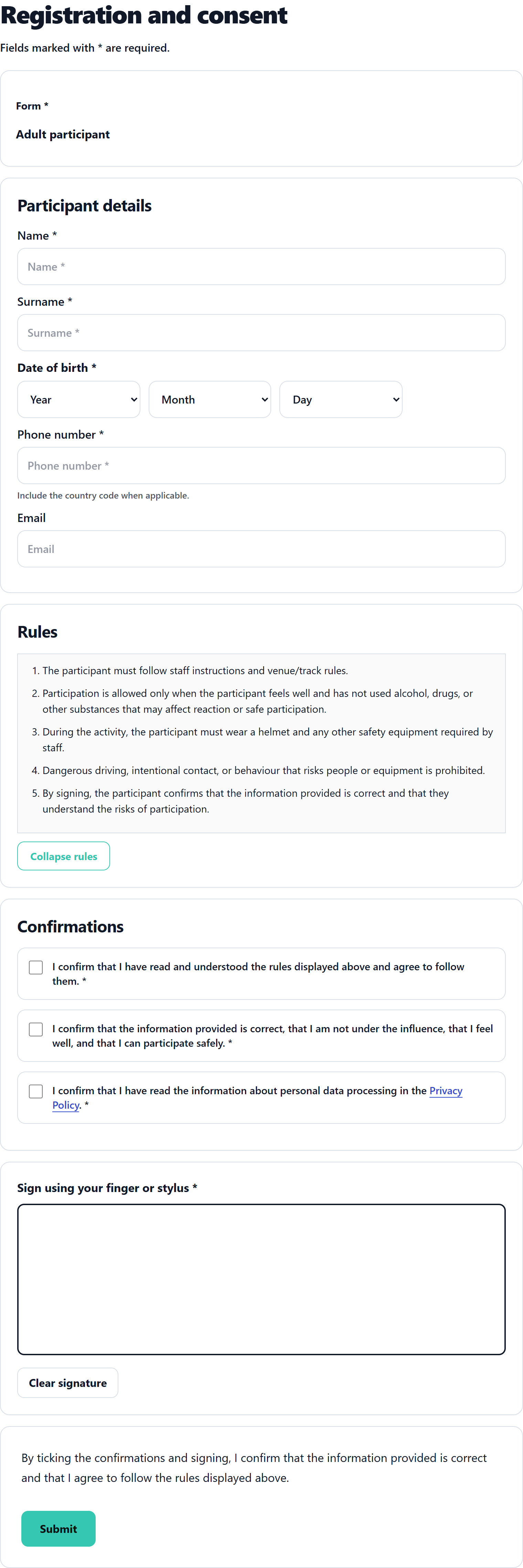

The preview shows the visitor form, not the kiosk reset workflow. Compare Sign editions.
For a shared tablet, see how to set up Sign for multiple visitors. Kiosk mode requires Pro or Business.
YOUR WORDPRESS BACK OFFICE
Find registrations and review signed records
Review submitted records and record staff decisions in WordPress.
See how completed forms and signatures are saved in WordPress.
Find a registration
Search for a participant, open their saved registration or download its PDF.

Record a staff review
Check the participant details and consent validity. Verify the registration, suspend it or flag an issue. Staff review records your team’s decision. Evidence integrity checks whether the saved evidence has changed.

AFTER SIGNING
Request new signatures and manage older records
Choose how long to keep records. Business adds requests for new agreements, scheduled reminders and automatic retention.
Request a new agreement
Ask people to sign again when your terms change or their consent runs out, and schedule reminders instead of sending them by hand. Sign Business
Review a person’s earlier agreements
Use the consent history to check earlier registrations and the agreement accepted on each occasion.
Choose when to delete old records
Choose how long to retain records and when to delete them. Sign Business applies your retention rules automatically.
Choose your Sign edition
Free covers individual and guardian registrations. Choose Pro for groups, kiosk mode and reporting, or Business for reminders and automatic retention.
SIGN FREE
Collect signed agreements
Free
Digital consent forms and signatures
Records saved in WordPress, plus a PDF of every agreement
Consent history
Tablet-friendly signing
SIGN PRO
Manage group registrations
€79 / year
Monthly option: €9.90 / month. Renews at the selected interval until cancelled.
Everything in Sign Free
Family and group registration
Email verification
Reports, advanced filters and filtered CSV
Kiosk, paper intake and licensed staff access
Available now
SIGN BUSINESS
Automate reminders and record deletion
€119 / year
Monthly option: €14.90 / month. Renews at the selected interval until cancelled.
Everything in Sign Pro
Requests for a new agreement
Bulk actions
Automated reminders and scheduling
Automatic record retention and deletion
Available now
Participant languages are included in every edition. Paid staff allowances depend on your license. Compare all features →
Common questions.
Is Sign only for activity venues?
No. Activity venues can use Sign for participant waivers, but any organization collecting agreements through WordPress can use it. Adult and guardian registration are included in Free; family registration requires Pro or Business.
Do visitors need a WordPress account to sign?
No. Visitors complete and sign the form on a public page of your website without signing in to WordPress.
What happens to signed records if my paid plan expires?
Expiry does not delete your existing registrations or PDFs. You can still view them and export an archive with Sign Free. Paid features and Pro updates depend on your plan. If Business access expires, automatic retention stops, so review how you will manage record deletion under your retention policy.